

Dashboard
Your whole lab.
One tab.
Your remote lab for embedded development: book a board, talk to it, power it and keep every result. Included on every cloud plan, and on-premise on your own servers.
One day with a board
that lives in another room.
Here is a normal day for a firmware engineer whose prototype sits on a bench in another building. Everything below happens in one browser tab.
Coffee first.
Then the whole fleet.
The first screen shows every CoreUnit in your organisation: how many are online, which are physical or virtual, and which board is free right now.
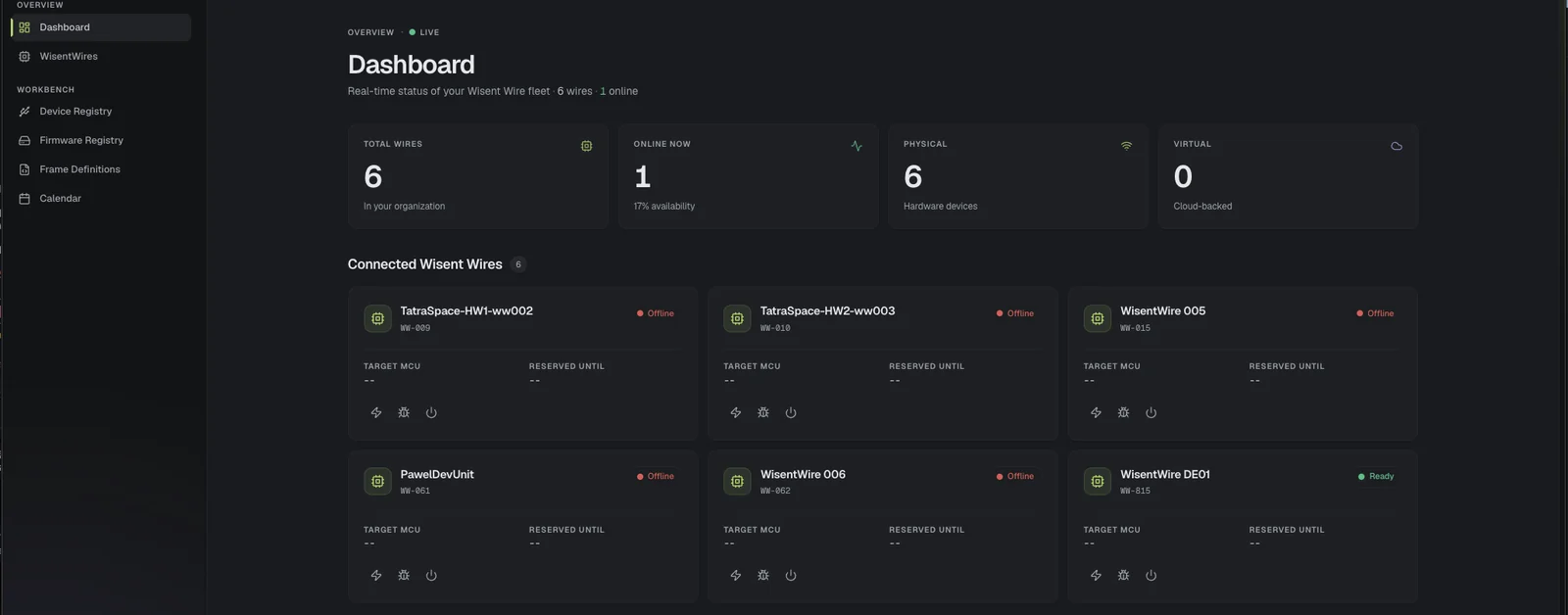
The fleet at a glance. Total units, how many are online, and how many are physical hardware or cloud-backed.
Every unit on one card. Status, target MCU and who has it reserved, before you open anything.
Flash, debug, power. Quick actions on each card, one click from the overview.
Book the board.
Like a meeting room.
Shared test bench booking replaces the chat thread about who has the prototype. Pick a unit and a time slot, add a note, and it is yours until the slot ends.
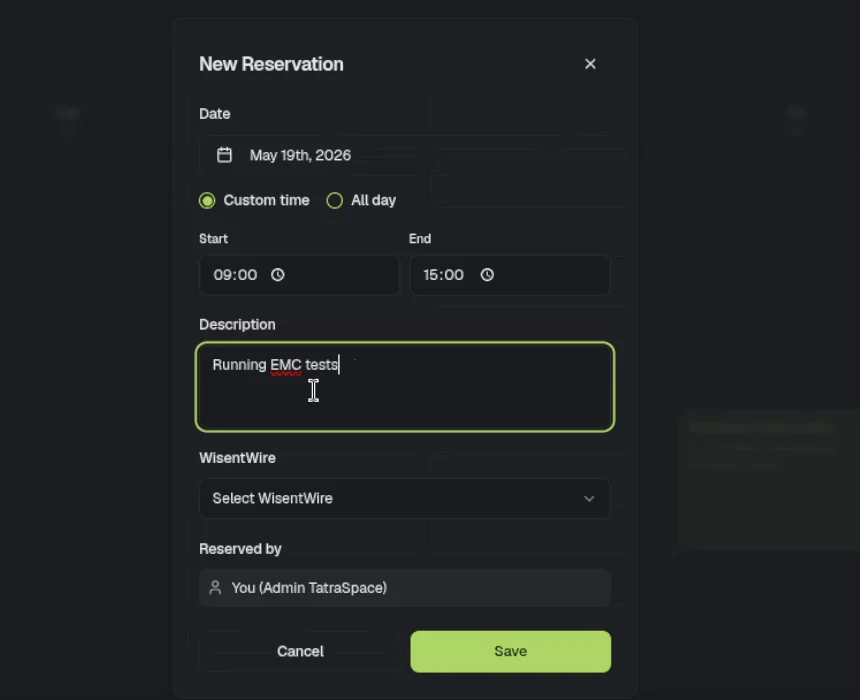
A week at a glance. Every reservation for every unit, so you can see when the board is free before you ask.
A slot or the whole day. Book exactly the hours you need, with a note like “Running EMC tests”.
Nobody steps on your run. While the slot is yours, nobody else can flash or power the board.
Open the unit.
Everything is already there.
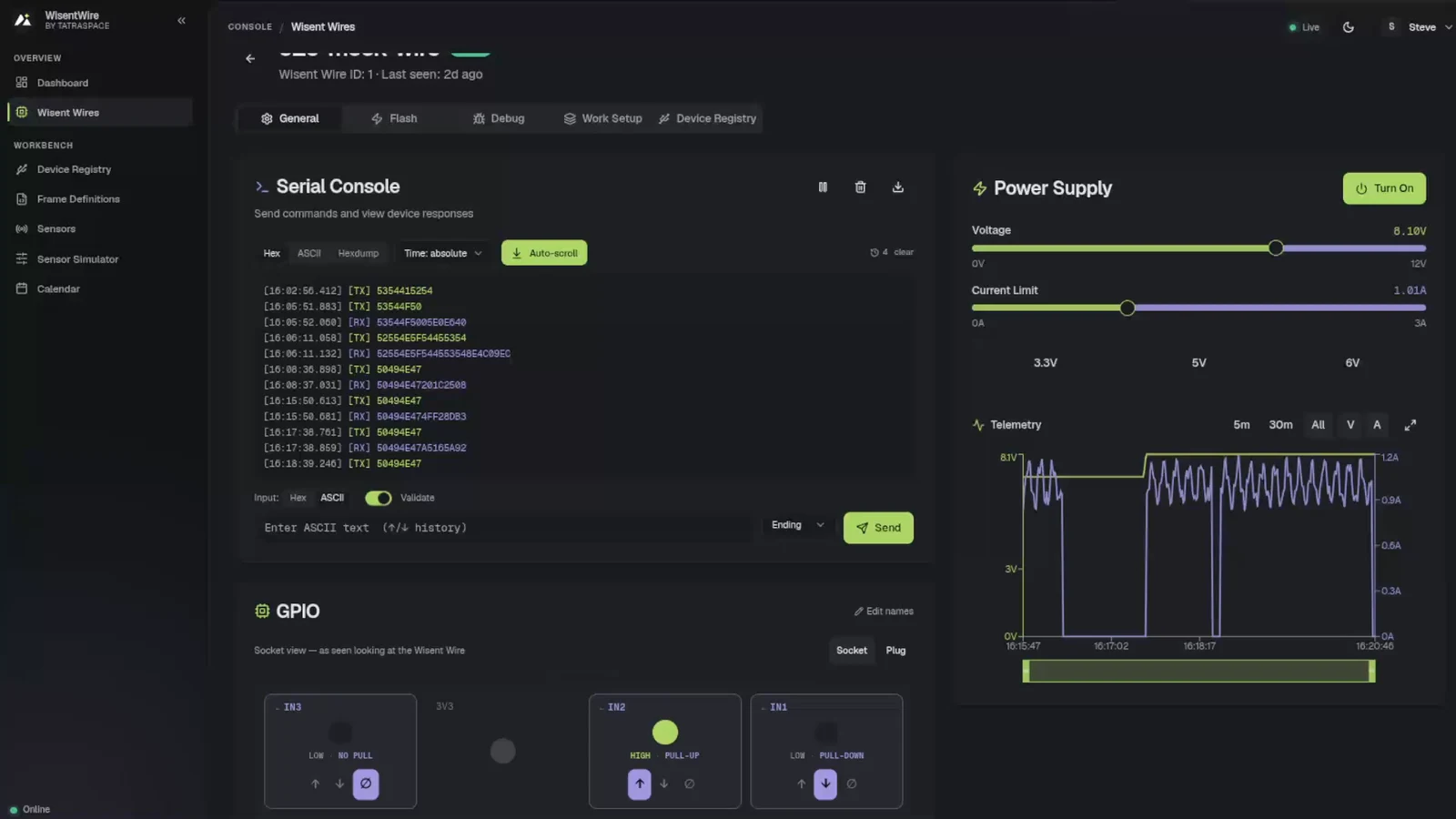
One page per CoreUnit, with everything wired to it side by side. Point at a number to see what it does.
- 1Serial console
Every byte in and out of the board, with timestamps.
- 2Power supply
Turn it on and off, set voltage and current limit.
- 3Telemetry
Voltage and current over 5 minutes, 30 minutes or the whole session.
- 4GPIO
Pins drawn the way they sit on the unit.
- 5Unit tabs
General, Flash, Debug, Work Setup, Device Registry and Log History.
- 6Workbench
Device registry, firmware registry, frame definitions and calendar.
- 7Live status
Online state and when the unit was last seen.
Flash a build
you can name.
Every binary your team uploads lands in one firmware registry, with its version, target and notes. You flash a build you can find again, not a file from someone’s Downloads folder.
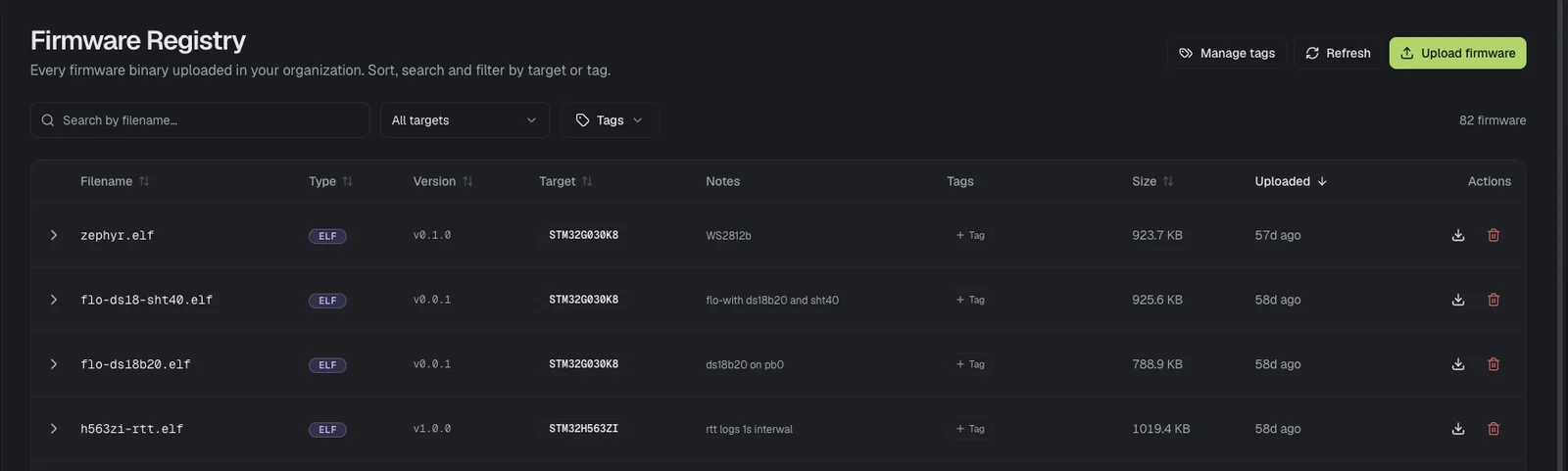
Search, sort and filter. By file name, target MCU or tag, across every build your organisation has uploaded.
Version and target on every file. Know which binary belongs on which board before it is flashed.
Notes and tags. “ds18b20 on pb0”, “rtt logs 1s interval”: the context stays with the build.
Talk to it.
Keep every byte.
The remote UART console logs both directions with timestamps, so the conversation you had with the board is still there tomorrow.
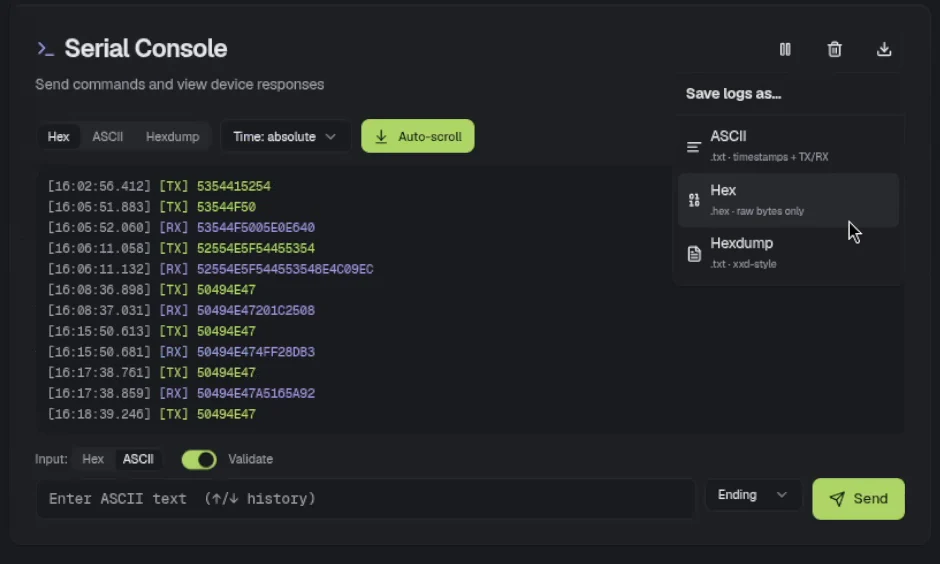
Read it your way. Hex, ASCII or a hexdump, with absolute timestamps. Pause, auto-scroll or clear.
Send it your way. Hex or ASCII with validation, a choice of line ending, and the arrow keys for history.
Take it with you. Save the log as text with timestamps, raw hex bytes or an xxd-style dump.
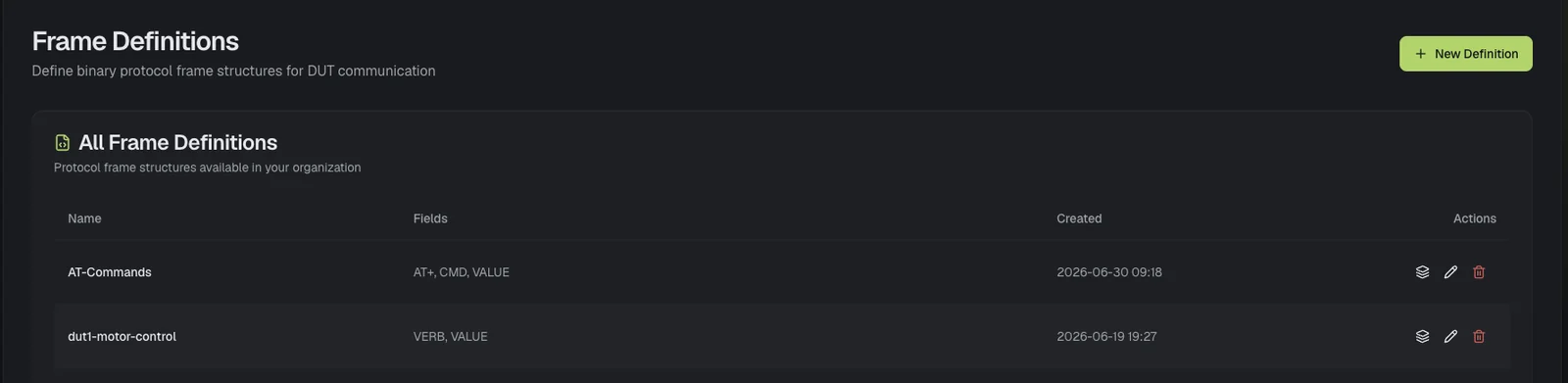
Speak your protocol, not raw hex.
Frame definitions describe the binary frames your device under test understands, field by field, so commands and replies read as CMD and VALUE instead of bytes.
Power it.
Watch what it draws.
The supply of the board under test, in the same tab as its console. Every change shows up on the chart within a second.
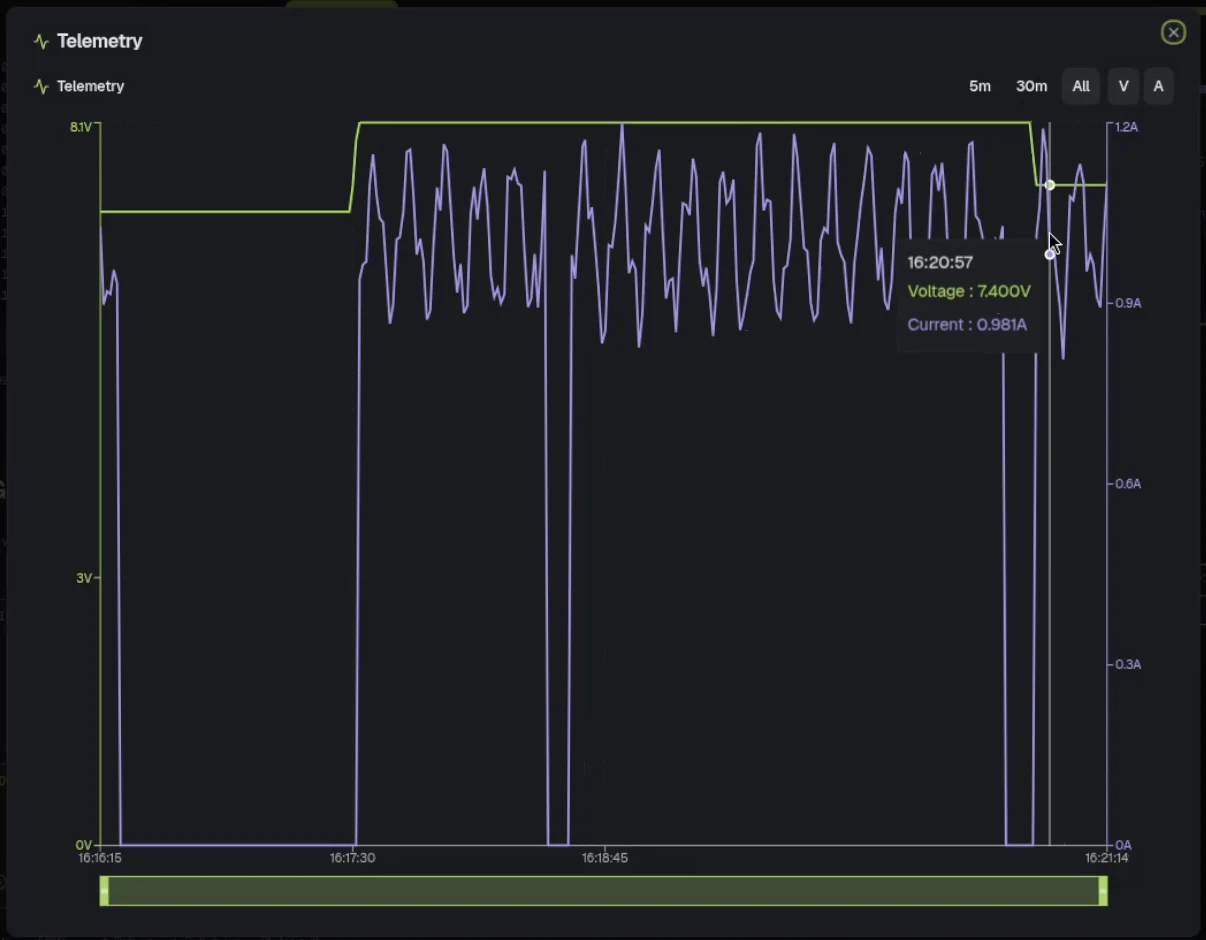
Voltage and current limit, on sliders. 0 to 12 V and 0 to 3 A, with presets for 3.3, 5 and 6 V.
Locked while it runs. Settings cannot change while the supply is on, so a test cannot be disturbed halfway.
Zoom into any moment. Hover for exact readings, drag the range bar, or open the chart full screen.
Plug in the supply you own.
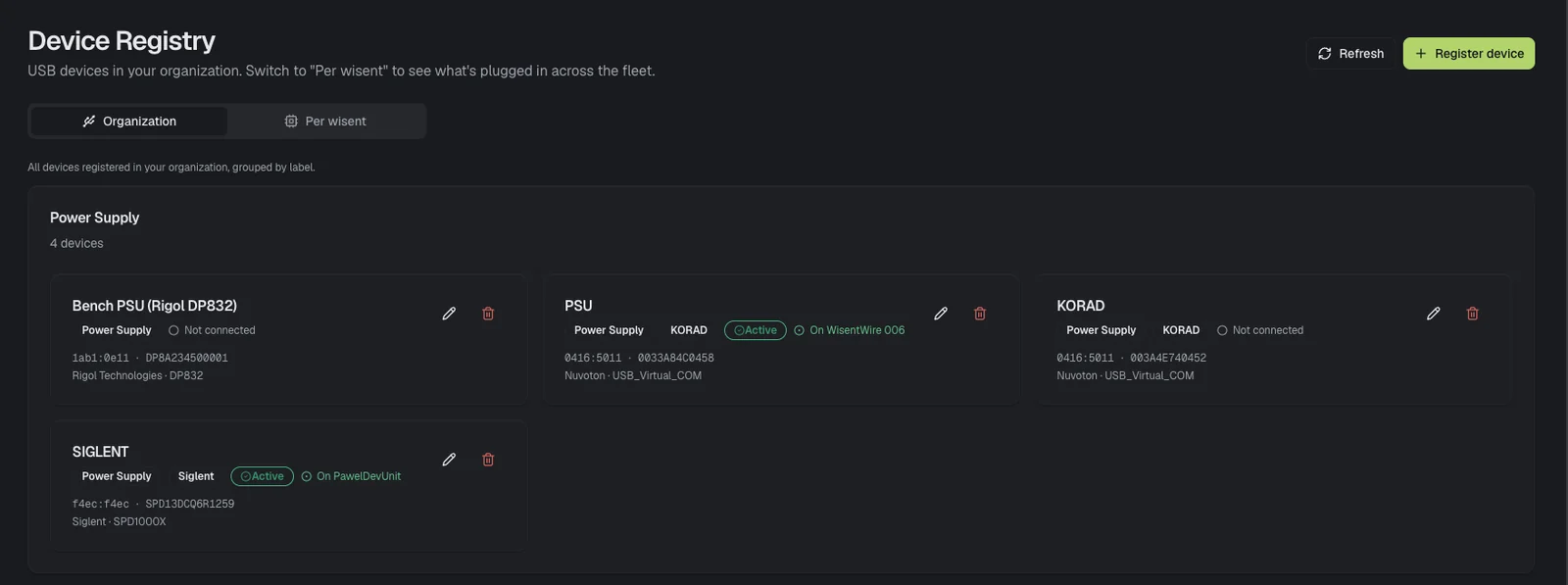
Bench supplies from Rigol, KORAD and Siglent register once in the Device Registry. Plug one into a CoreUnit and it drives that unit’s power, along with the programmer next to it.
See what is plugged in where, across the whole fleet or per unit, and which device is active on which CoreUnit.
Wire it once.
Name it once.
GPIO is drawn as the connector you are looking at. Give pins the names of your signals and everyone sees BOOT and RESET instead of OUT1 and OUT2.
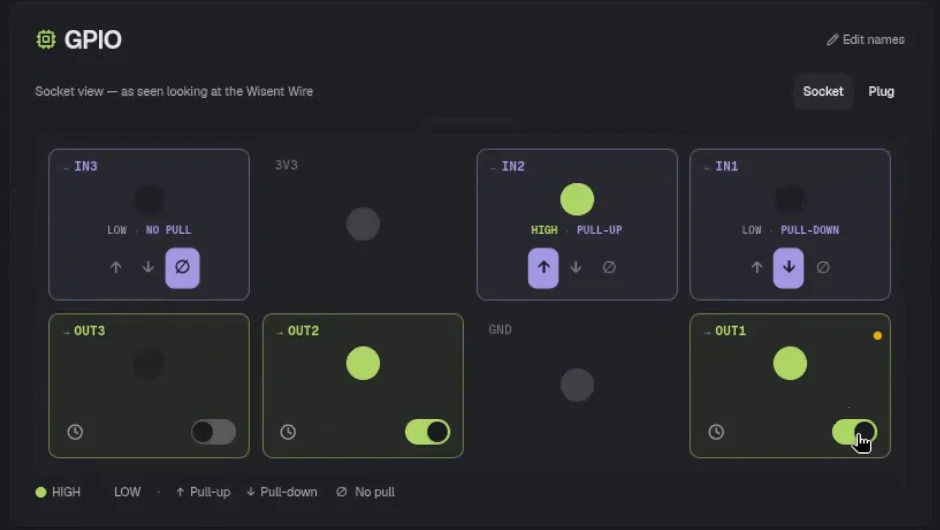
Inputs at a glance. HIGH or LOW for every input, with pull-up, pull-down or no pull.
Outputs on a toggle. Drive reset, boot and enable lines with a click.
Socket or plug view. Flip the drawing to match the side you are wiring from.
The test fails.
The evidence is already there.
No one has to reproduce the bug to start looking at it. Log History keeps the power supply and every GPIO input of the unit, for the last hour or the last week.
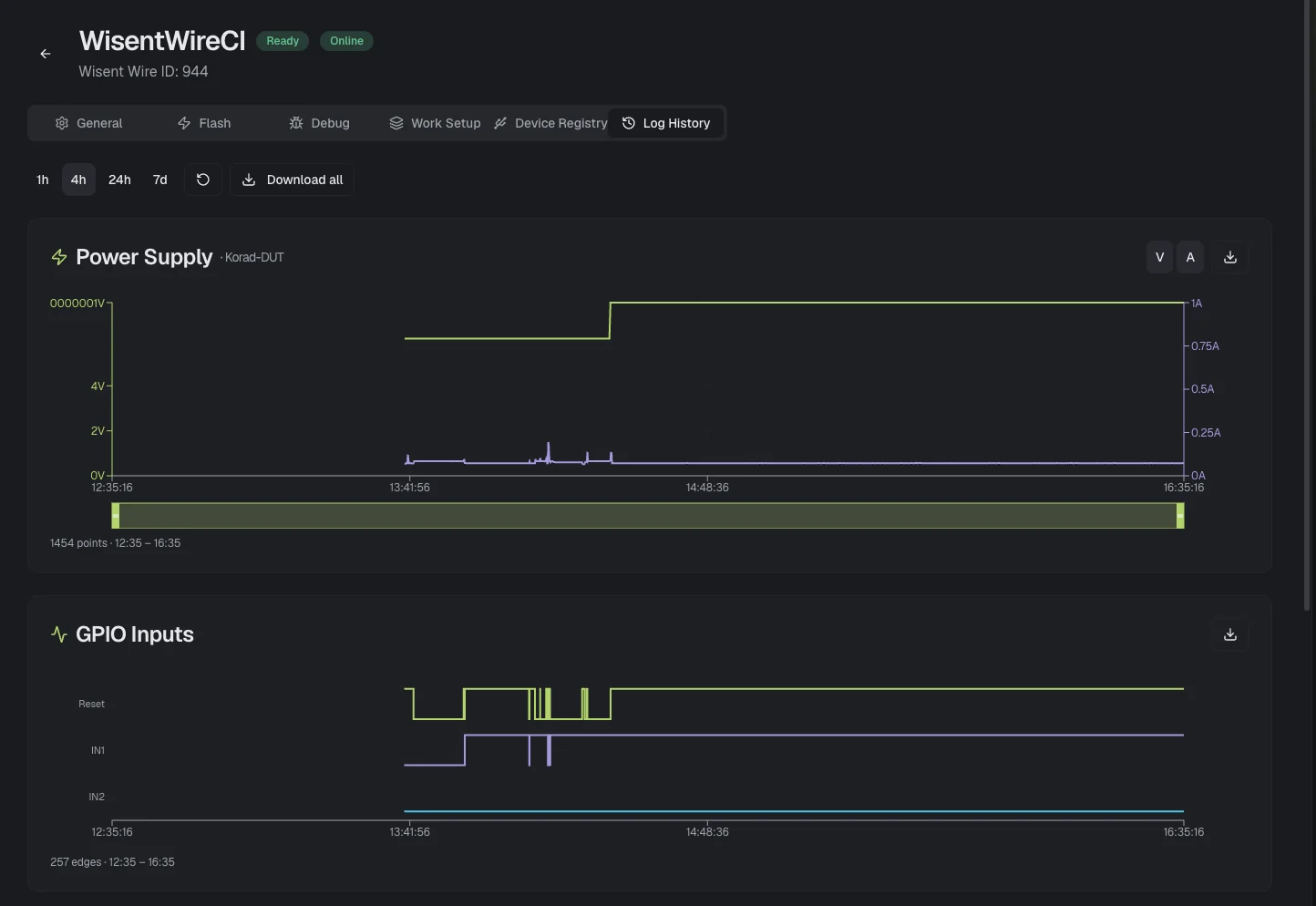
Power and pins, side by side. Voltage, current and every GPIO edge on the same time axis, so cause and effect line up.
1 hour to 7 days. Zoom out to see when it started, zoom in to the moment it broke.
Download all. Export the traces and attach them to the bug report.
Attach the debugger.
From your desk.
Start a GDB server on the unit with one click and connect from your IDE. Add a SEGGER RTT channel alongside it, or run RTT on its own.
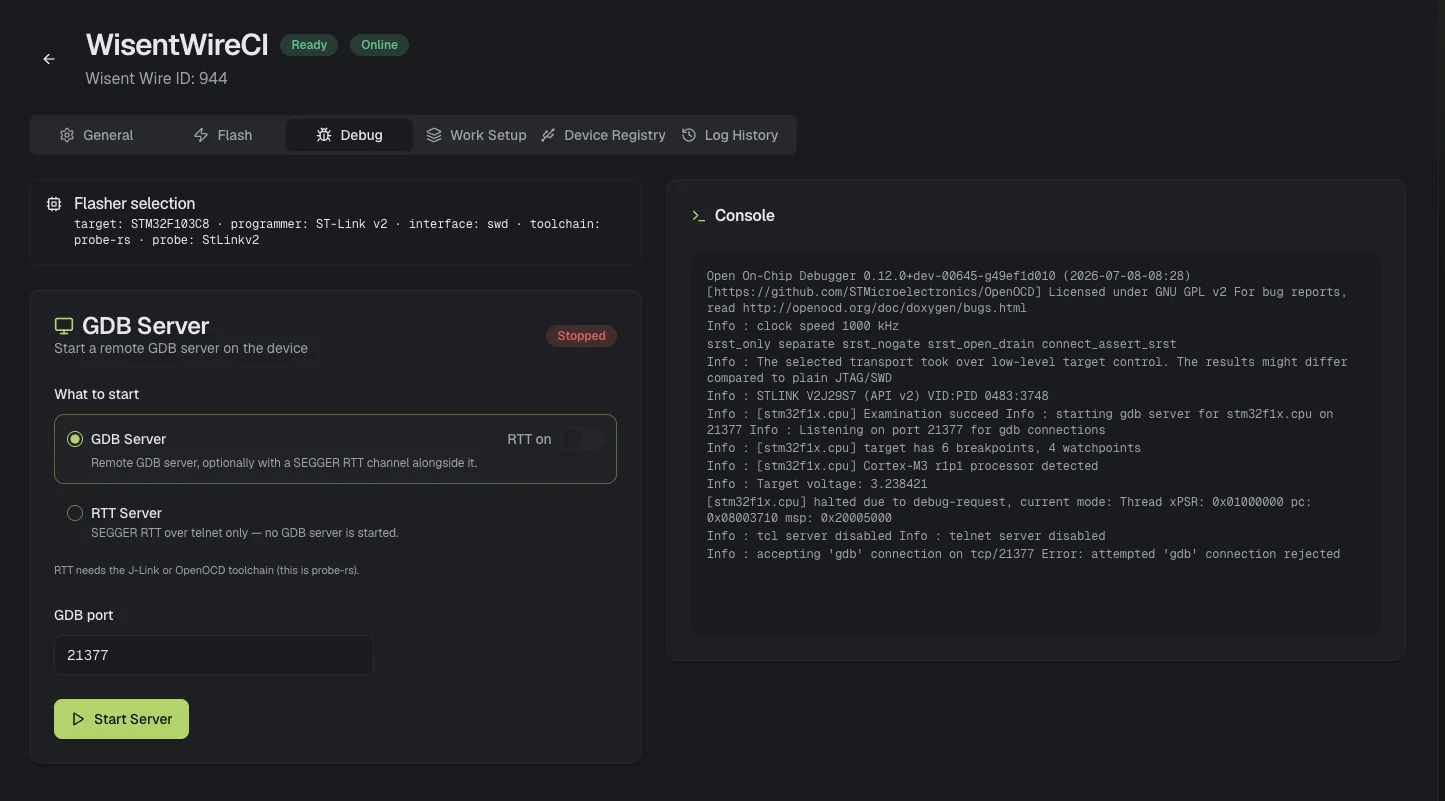
GDB server, one click. Pick the port, press Start Server, and point arm-none-eabi-gdb or your IDE at the unit.
RTT with it, or alone. A SEGGER RTT channel next to GDB, or RTT over telnet without a debugger attached.
Your probe, your toolchain. The flasher shows target, programmer, interface and toolchain: probe-rs, OpenOCD or J-Link.
Go home.
The tests keep running.
Everything you did by hand today is an API call. Hand the board to your CI pipeline overnight, to an AI agent while you sleep, and soon to your Robot Framework suites.
from wisentwire import WisentWireClient def test_lcd_turns_on(client: WisentWireClient): # Flash the firmware under test and reset the board fw = client.upload_firmware( filename="uart-lcd.hex", data=hex_bytes, target="msp430" ) job = client.flash( ww_id=22, firmware_id=fw.id, flasher="msp430", reset=True ) client.wait_flash_complete(ww_id=22, job_id=job, timeout=120) # Send "ON\n" over UART and expect "ON" back client.send_uart(ww_id=22, hex_data="4F4E0A") reply = client.wait_for_uart_rx( ww_id=22, match_hex="4F4E", timeout=5 ) assert "4f4e" in reply.bytes_hex.lower()Runs anywhere Python runs: your laptop, GitHub Actions, GitLab CI or Jenkins.
- You
The robot no longer stops at the table edge after my last change. Find out why and fix it.
I’ll reproduce it on real hardware first, with a test we can keep.
Reserved WisentWire DE01
STM32F103C8 with the sumo robot, until 19:00Wrote tests/test_edge_stop.py
def test_stops_at_edge(unit):
    unit.power(on=True, voltage=7.4)
    unit.uart.send("RUN")
    edge = unit.gpio.wait_high("IN1", timeout=5)
    stop = unit.uart.wait_for("motor: stop", timeout=1)
    assert stop.time - edge.time < 0.010
Ran the test on DE01: failed
IN1 went high at 3.41 s, but the motor kept running for 412 msThe edge is seen, but the stop arrives late. In
ir_read()the sample is scaled twice, so it crosses the threshold one control cycle after it should.Edited src/ir.c
+2 −2 remove the second scalingBuilt robot.elf and flashed DE01
27.1 KB, verifiedRan the test on DE01: passed
motor stopped 3 ms after the edgeFixed and proven on the robot. The new test runs in CI on every commit, and the logs and power trace of both runs are attached.
The agent reproduces the bug with a test on real hardware, fixes the code, and proves the fix with the same test.
*** Settings ***Library WisentWire unit=22Suite Setup Reserve UnitSuite Teardown Release Unit *** Test Cases ***LCD Turns On Over UART Flash Firmware uart-lcd.hex target=msp430 Power On voltage=3.3 Send UART ON\n UART Should Receive ON timeout=5s Board Recovers From Brown-Out Power On voltage=3.3 Set Voltage 2.7 Sleep 500ms Set Voltage 3.3 GPIO Should Be High IN1 timeout=2sA Robot Framework library is on the way: the same power, flash, UART and GPIO actions as readable keywords. This is an early proof of concept, and keyword names may still change. Get notified
Your servers or ours.
The same dashboard.
Cloud. We host it and keep it up to date. Reach every bench from anywhere.
On-premise. The same dashboard on your own servers, with roles and an audit log.
Self-hosted. Free and feature-limited: the CLI, the Python SDK and the MCP server on one machine, for a single user. The web dashboard is not part of it.
Stop reading about it.
Drive a real board.
Three ways in. Start free with an account, buy CoreUnits or a paid plan, get a quote for on-premise, or spend 30 minutes with an engineer driving a real CoreUnit on our bench from your own browser.
Start free
€0 no card, 5 bench-days a month
- Turns the Linux PC already on your bench into a WisentWire bench
- Dashboard, API, CI and MCP on every cloud plan
- Unlimited benches, and idle ones cost nothing
Buy now
€649 per CoreUnit, one-time
- Plus, Pro and Ultimate plans from €19.99 a month
- GPIO, PWM, DAC and signal generation on a CoreUnit
- On-premise: the full app on your own servers
- Professional support in building test setups
Book a 30‑min live demo
Free, with one of our embedded engineers
- You drive: power, flash and UART on a real board
- Bring your MCU and we check the fit
- Your setup: cloud, on-premise or self-hosted
- Questions answered by the people who built it